Quickly launch menu items
Atomic Beef is a nice, free program only available for Mac, being part of the category Utilities with subcategory Launchers & Desktop.
Top Recommended Alternative
More about Atomic Beef
This program is available for users with the operating system Mac OS X and previous versions, and you can download it only in English. Its current version is 1.3 and was updated on 6/08/2006.
About the download, Atomic Beef is a relatively light program that will not require as much free space than the average program in the category Utilities.
Since the program was added to our catalog in 2006, it has already reached 420 downloads, and last week it gained 0 downloads.
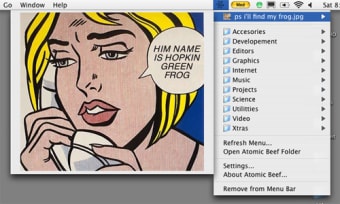
Atomic Beef is an app/file menu item launcher. Put items in the Atomic Beef Menu Items Folder, and they will appear in the Atomic Beef menu item.
It's slow and pokey, but it works. Double click the icon to launch. To add items to the menu, choose "Open Atomic Beef Folder. . . " from the menu and put files, folders, aliases, whatever in there.
To add a menu separator, simple create an empty folder or file and give it a name with the extension . separator, like "Pictures. separator". You can change the separator extension to be whatever you want in the preferences, though.
You can also set it to skip items begining with a defined character (like "~"), skip empty folders, limit the depth of folders it will display, etc.